Wednesday, October 23, 2013
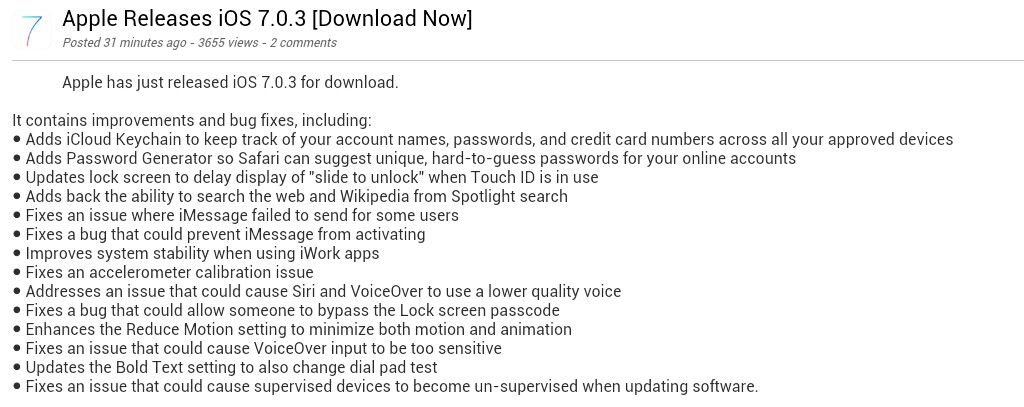
Apple Releases iOS 7.0.3
7.0.3 (4 GSM): iPhone3,1_7.0.3_11B511_Restore.ipsw
7.0.3 (4 8GB): iPhone3,2_7.0.3_11B511_Restore.ipsw
7.0.3 (4 CDMA): iPhone3,3_7.0.3_11B511_Restore.ipsw
7.0.3 (4S): iPhone4,1_7.0.3_11B511_Restore.ipsw
7.0.3 (5 GSM): iPhone5,1_7.0.3_11B511_Restore.ipsw
7.0.3 (5 GSM+CDMA): iPhone5,2_7.0.3_11B511_Restore.ipsw
7.0.3 (5c GSM): iPhone5,3_7.0.3_11B511_Restore.ipsw
7.0.3 (5c GSM+CDMA): iPhone5,4_7.0.3_11B511_Restore.ipsw
7.0.3 (5s GSM): iPhone6,1_7.0.3_11B511_Restore.ipsw
7.0.3 (5s GSM+CDMA): iPhone6,2_7.0.3_11B511_Restore.ipsw
7.0.3 (iPad 2 Wi-Fi): iPad2,1_7.0.3_11B511_Restore.ipsw
7.0.3 (iPad 2 GSM): iPad2,2_7.0.3_11B511_Restore.ipsw
7.0.3 (iPad 2 CDMA): iPad2,3_7.0.3_11B511_Restore.ipsw
7.0.3 (iPad 2 New): iPad2,4_7.0.3_11B511_Restore.ipsw
7.0.3 (iPad Mini Wi-Fi): iPad2,5_7.0.3_11B511_Restore.ipsw
7.0.3 (iPad Mini GSM): iPad2,6_7.0.3_11B511_Restore.ipsw
7.0.3 (iPad Mini CDMA): iPad2,7_7.0.3_11B511_Restore.ipsw
7.0.3 (iPad 3 Wi-Fi): iPad3,1_7.0.3_11B511_Restore.ipsw
7.0.3 (iPad 3 CDMA): iPad3,2_7.0.3_11B511_Restore.ipsw
7.0.3 (iPad 3 GSM): iPad3,3_7.0.3_11B511_Restore.ipsw
7.0.3 (iPad 4 Wi-Fi): iPad3,4_7.0.3_11B511_Restore.ipsw
7.0.3 (iPad 4 GSM): iPad3,5_7.0.3_11B511_Restore.ipsw
7.0.3 (iPad 4 GSM+CDMA): iPad3,6_7.0.3_11B511_Restore.ipsw
7.0.3 (iPad Air Wi-Fi): iPad4,1_7.0.3_11B511_Restore.ipsw
7.0.3 (iPad Air Cellular): iPad4,2_7.0.3_11B511_Restore.ipsw
7.0.3 (iPad Mini 2 Wi-Fi): iPad4,4_7.0.3_11B511_Restore.ipsw
7.0.3 (iPad Mini 2 Cellular): iPad4,5_7.0.3_11B511_Restore.ipsw
Friday, September 27, 2013
iOS 7.0.2 Released to the Public
Yesterday, Apple released iOS 7.0.2 to the public. iOS 7.0.2 is one of
the three additional software updates that were found to be in testing
along with iOS 7.0.1 (iPhone 5s and iPhone 5c only) and iOS 7.1 (still
unreleased).
iOS 7.0.2 is a small update for iOS 7 devices that fixes one of the known lock screen bypass glitches. In addition, it re-introduces the Greek keyboard option for entering passcodes.
At this point in time, the evad3rs are confident in a jailbreak for iOS 7.0, but they have not yet commented on the status of iOS 7.0.2. We expect that Apple, being themselves as usual, probably tucked some security updates in iOS 7.0.2. We would recommend holding off until the evad3rs have had a chance to check out the firmware.
On the other hand, if getting rid of the potentially harmful lock screen glitch is at the top of your priority list right now, then iOS 7.0.2 is available OTA (over the air) in the Settings application under the Software Update cell. You can also use iTunes if you prefer.
This article was originally published in forum thread: iOS 7.0.2 Released to the Public started.
Luckily, Apple prides itself on keeping security issues down to a minimum, and has been typically swift in its response to these well-documented problems. If you’re running iOS 7 on any device, we highly recommend you go ahead and download the update using iTunes, or simply using the OTA feature within your iPhone, iPad or iPod’s Settings pane.
iOS 7.0.2 is compatible to work with: iPhone 5s, 5c, 5, 4s, 4, iPad (2nd-gen and above), iPad mini, iPod touch (5th-gen).
iOS 7.0.2 Download Links:
* Apple releases iOS 7.0.2 fixes Lock screen vulnerability...
iOS 7.0.2 is a small update for iOS 7 devices that fixes one of the known lock screen bypass glitches. In addition, it re-introduces the Greek keyboard option for entering passcodes.
At this point in time, the evad3rs are confident in a jailbreak for iOS 7.0, but they have not yet commented on the status of iOS 7.0.2. We expect that Apple, being themselves as usual, probably tucked some security updates in iOS 7.0.2. We would recommend holding off until the evad3rs have had a chance to check out the firmware.
On the other hand, if getting rid of the potentially harmful lock screen glitch is at the top of your priority list right now, then iOS 7.0.2 is available OTA (over the air) in the Settings application under the Software Update cell. You can also use iTunes if you prefer.
This article was originally published in forum thread: iOS 7.0.2 Released to the Public started.
Luckily, Apple prides itself on keeping security issues down to a minimum, and has been typically swift in its response to these well-documented problems. If you’re running iOS 7 on any device, we highly recommend you go ahead and download the update using iTunes, or simply using the OTA feature within your iPhone, iPad or iPod’s Settings pane.
iOS 7.0.2 is compatible to work with: iPhone 5s, 5c, 5, 4s, 4, iPad (2nd-gen and above), iPad mini, iPod touch (5th-gen).
iOS 7.0.2 Download Links:
- iPad (4th generation CDMA)
- iPad (4th generation GSM)
- iPad (4th generation WiFi)
- iPad mini (CDMA)
- iPad mini (GSM)
- iPad mini (WiFi)
- iPad 3 Wi-Fi (3rd generation)
- iPad 3 Wi-Fi + Cellular (model for ATT)
- iPad 3 Wi-Fi + Cellular (model for Verizon)
- iPad 2 Wi-Fi (Rev A)
- iPad 2 Wi-Fi
- iPad 2 Wi-Fi + 3G (GSM)
- iPad 2 Wi-Fi + 3G (CDMA)
- iPhone 5 (CDMA)
- iPhone 5 (GSM)
- iPhone 5c (CDMA)
- iPhone 5c (GSM)
- iPhone 5s (CDMA)
- iPhone 5s (GSM)
- iPhone 4s
- iPhone 4 (GSM Rev A)
- iPhone 4 (GSM)
- iPhone 4 (CDMA)
- iPod touch (5th generation)
* Apple releases iOS 7.0.2 fixes Lock screen vulnerability...
Thursday, September 19, 2013
Download iOS 7 Final IPSW For iPhone 5, 4s, 4, iPad And iPod touch
iPad (4th generation CDMA)
iPad (4th generation GSM)
iPad (4th generation WiFi)
iPad mini (CDMA)
iPad mini (GSM)
iPad mini (WiFi)
iPad 3 Wi-Fi (3rd generation)
iPad 3 Wi-Fi + Cellular (model for ATT)
iPad 3 Wi-Fi + Cellular (model for Verizon)
iPad 2 Wi-Fi (Rev A)
iPad 2 Wi-Fi iPad 2 Wi-Fi + 3G (GSM)
iPad 2 Wi-Fi + 3G (CDMA)
iPhone 5 (CDMA)
iPhone 5 (GSM)
iPhone 4s
iPhone 4 (GSM Rev A)
iPhone 4 (GSM)
iPhone 4 (CDMA)
iPod touch (5th generation)
iPad (4th generation GSM)
iPad (4th generation WiFi)
iPad mini (CDMA)
iPad mini (GSM)
iPad mini (WiFi)
iPad 3 Wi-Fi (3rd generation)
iPad 3 Wi-Fi + Cellular (model for ATT)
iPad 3 Wi-Fi + Cellular (model for Verizon)
iPad 2 Wi-Fi (Rev A)
iPad 2 Wi-Fi iPad 2 Wi-Fi + 3G (GSM)
iPad 2 Wi-Fi + 3G (CDMA)
iPhone 5 (CDMA)
iPhone 5 (GSM)
iPhone 4s
iPhone 4 (GSM Rev A)
iPhone 4 (GSM)
iPhone 4 (CDMA)
iPod touch (5th generation)
Monday, September 3, 2012
HTC Radar C110 (Windows) Update via ZUNE
Just wanna share HTC Radar C110 windows phone update via ZUNE
by the way the problem of the unit why i am gonna do this is
when you call the screen get black display...
you cant see any thing just black display...
dont be afraid its not risky
must have 50% of battery
you must have ZUNE Software
and patience
check image below on how to...
Open Zune
Connect Unit on PC via USB
Install all driver @ Zune folder ( C:\Program Files\Zune)
by the way the problem of the unit why i am gonna do this is
when you call the screen get black display...
you cant see any thing just black display...
dont be afraid its not risky
must have 50% of battery
you must have ZUNE Software
and patience
check image below on how to...
Open Zune
Connect Unit on PC via USB
Install all driver @ Zune folder ( C:\Program Files\Zune)
Thursday, May 10, 2012
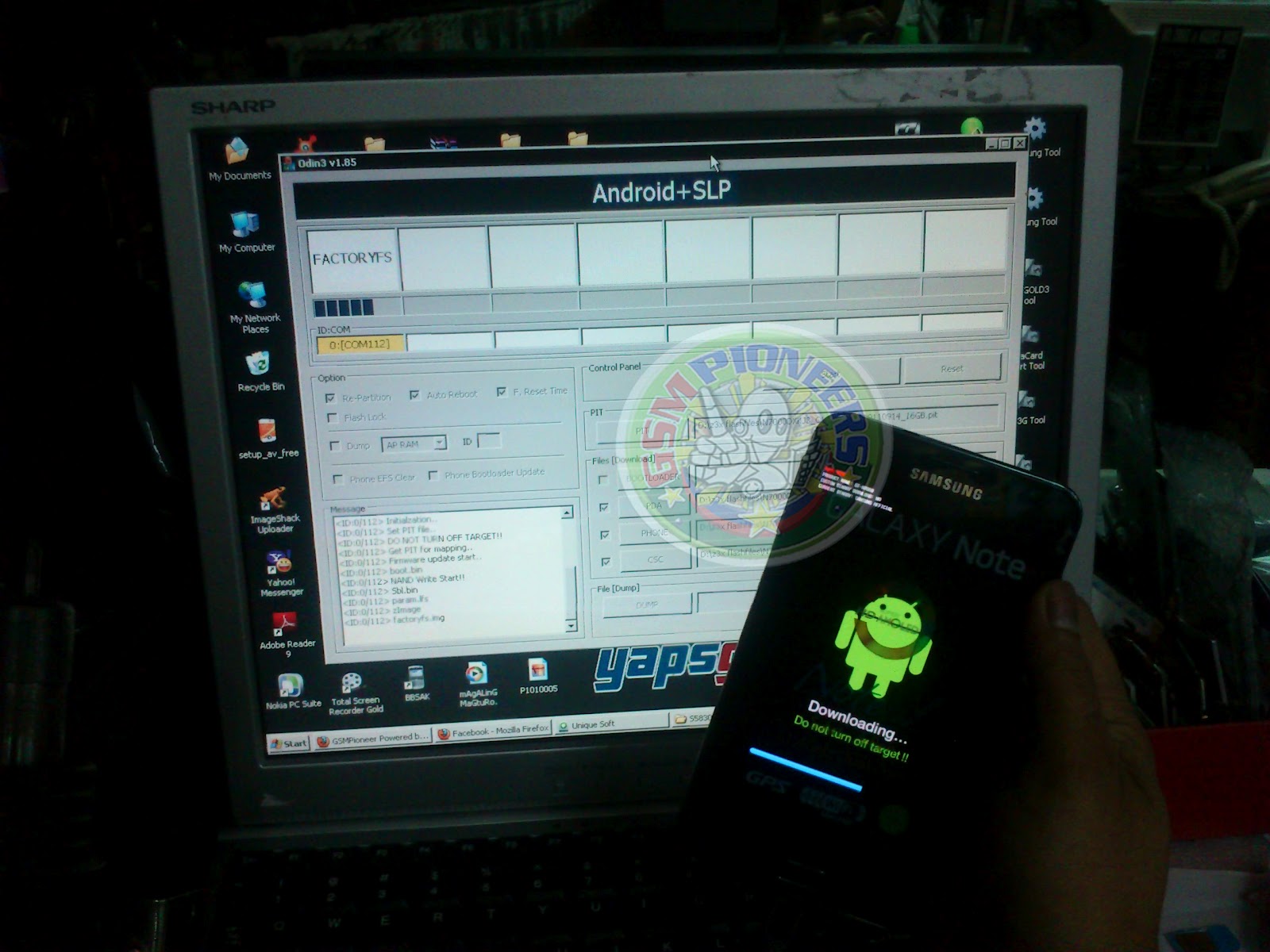
Samsung Galaxy Note N7000 Hang Revived by ODIN
just wanna share again this solution for refference...
Samsung Galaxy Note N7000 hang revived by ODIN
you must have ODIN V1.85
and add this : "PIT"
you can download Firmware @ www.samfirmware.com
just look at the image of odin software below for the instruction on how to insert firmware and also the settings.
you must have ODIN V1.85
and add this : "PIT"
you can download Firmware @ www.samfirmware.com
just look at the image of odin software below for the instruction on how to insert firmware and also the settings.
Tuesday, April 17, 2012
Samsung s5360T unlocked (18 pcs)
Procedure:
1. update the unit first using this file( ROOT)
2.after update, open z3x tool then tick info.
3. tick unlock
4.automaticaly restart the phone and finaly put simcard the phone is unlocked already .

Friday, April 6, 2012
HUAWEI U8230 Hang on Android Logo.
hope you do it your self also if you got this problem too:)
1:Copy dload to SD card( you can check download link below)
2:Switch off the handset ,then press "Volume Control Upper Key +End Key+ Power Key"
3:Wait the phone update and start up...
Done:)
Download:
HUAWEI U8230 Firmware
if have something questions just leave @ my chatbox.
br,
1:Copy dload to SD card( you can check download link below)
2:Switch off the handset ,then press "Volume Control Upper Key +End Key+ Power Key"
3:Wait the phone update and start up...
Done:)
Download:
HUAWEI U8230 Firmware
if have something questions just leave @ my chatbox.
br,
Subscribe to:
Comments (Atom)