Sunday, November 30, 2014
TaiG releases jailbreak for iOS 8.1.1 and iOS 8.2 beta
TaiG released a jailbreak for iOS 8.1.1 and iOS 8.2 beta devices this morning, roughly two weeks after Apple closed the latest Pangu jailbreak by releasing iOS 8.1.1. For those unfamiliar with the TaiG team, they were behind the third-party Chinese app store-evad3rs controversy last fall.
It’s surprising that the team chose to release at this time, given that the previous jailbreak has only be defunct for a few weeks, and Apple is in the middle of testing iOS 8.2. But long-time jailbreak community patriarch MuscleNerd speculates that it likely had something to do with money.
Updating…
http://www.idownloadblog.com/2014/11...ilbreak-8-1-1/
Tuesday, November 18, 2014
Apple releases iOS 8.1.1 with bug fixes, increased stability and performance improvements for iPad 2 and iPhone 4s [Updated]
Apple has just released iOS 8.1.1 (build number: 12B435) for iPhone,
iPad and iPod touch. Apple had seeded iOS 8.1.1 beta to developers two
weeks back.
According to the release notes iOS 8.1.1 includes number of bug fixes and brings improved stability. According to Apple, iOS 8.1.1 also includes performance improvements for iPad 2 and iPhone 4s, but a video comparison of iPhone 4s running on iOS 8.1 and iOS 8.1.1 did not reveal any major improvements on older iOS devices
This release includes bug fixes, increased stability and performance improvements for iPad 2 and iPhone 4s.
iOS 8.1.1 is compatible with the following iOS devices:
iPhone 4S, iPhone 5, iPhone 5c, iPhone 5s, iPhone 6, iPhone 6 Plus
iPad Air 2, iPad mini 3, iPad 2, iPad (third-generation), iPad (fourth-generation), iPad Air, iPad mini, iPad mini with Retina display
iPod touch 5G
Jailbreakers should avoid upgrading to iOS 8.1.1 as it kills the Pangu iOS 8.0.x-iOS 8.1 jailbreak. Apple seems to have fixed at least one exploit used by the Pangu jailbreak, so you won’t be able to jailbreak your device using Pangu after upgrading to iOS 8.1.1.
If you don’t care about jailbreaking, then the update is available as an OTA download for these devices currently. The OTA update is 64.7 MB for iPhone 6 Plus.
If you’re not getting the OTA update, then you can download the iOS 8.1.1 ipsw (firmware file) using the direct download links provided below. If you need help then check out our guide, which shows you how to install the iOS 8.1.1 update on your iPhone, iPad or iPod touch.
iPad:
iPad Air 2 (6th generation WiF)
iPad Air 2 (6th generation Cellular)
iPad Air (5th generation WiFi + Cellular)
iPad Air (5th generation WiFi)
iPad Air (5th generation CDMA)
iPad (4th generation CDMA)
iPad (4th generation GSM)
iPad (4th generation WiFi)
iPad mini (CDMA)
iPad mini (GSM)
iPad mini (WiFi)
iPad mini 2 (WiFi + Cellular)
iPad mini 2 (WiFi)
iPad mini 2 (CDMA)
iPad mini 3 (China)
iPad mini 3 (WiFi)
iPad mini 3 (Cellular)
iPad 3 Wi-Fi (3rd generation)
iPad 3 Wi-Fi + Cellular (GSM)
iPad 3 Wi-Fi + Cellular (CDMA)
iPad 2 Wi-Fi (Rev A)
iPad 2 Wi-Fi
iPad 2 Wi-Fi + 3G (GSM)
iPad 2 Wi-Fi + 3G (CDMA)
iPhone:
iPhone 6
iPhone 6 Plus
iPhone 5 (GSM)
iPhone 5c (CDMA)
iPhone 5c (GSM)
iPhone 5s (CDMA)
iPhone 5s (GSM)
iPhone 4s
iPod touch:
iPod touch (5th generation)
Let us know if you’ve found any other changes or improvements in iOS 8.1.1 in the comments below.
Update 1:
Updated with direct download links.
Update 2:
Some users are reporting that after installing the update, they were prompted to log back into iCloud (which was requested previously), and also review iMessage settings, which wasn’t required previously.
Update 3:
Jailbreakers should avoid the iOS 8.1.1 update as Apple has patched at least one of the exploit used by Pangu jailbreak, so iOS 8.1.1 kills Pangu jailbreak.
Update 4:
Apple is still signing iOS 8.1, so if you haven’t upgraded yet, then this could be your last chance to update to iOS 8.1 and jailbreak with Pangu. If you need help on how to update to iOS 8.1 and jailbreak using Pangu then check out guides for the step-by-step instructions.
According to the release notes iOS 8.1.1 includes number of bug fixes and brings improved stability. According to Apple, iOS 8.1.1 also includes performance improvements for iPad 2 and iPhone 4s, but a video comparison of iPhone 4s running on iOS 8.1 and iOS 8.1.1 did not reveal any major improvements on older iOS devices
This release includes bug fixes, increased stability and performance improvements for iPad 2 and iPhone 4s.
iOS 8.1.1 is compatible with the following iOS devices:
iPhone 4S, iPhone 5, iPhone 5c, iPhone 5s, iPhone 6, iPhone 6 Plus
iPad Air 2, iPad mini 3, iPad 2, iPad (third-generation), iPad (fourth-generation), iPad Air, iPad mini, iPad mini with Retina display
iPod touch 5G
Jailbreakers should avoid upgrading to iOS 8.1.1 as it kills the Pangu iOS 8.0.x-iOS 8.1 jailbreak. Apple seems to have fixed at least one exploit used by the Pangu jailbreak, so you won’t be able to jailbreak your device using Pangu after upgrading to iOS 8.1.1.
If you don’t care about jailbreaking, then the update is available as an OTA download for these devices currently. The OTA update is 64.7 MB for iPhone 6 Plus.
If you’re not getting the OTA update, then you can download the iOS 8.1.1 ipsw (firmware file) using the direct download links provided below. If you need help then check out our guide, which shows you how to install the iOS 8.1.1 update on your iPhone, iPad or iPod touch.
iPad:
iPad Air 2 (6th generation WiF)
iPad Air 2 (6th generation Cellular)
iPad Air (5th generation WiFi + Cellular)
iPad Air (5th generation WiFi)
iPad Air (5th generation CDMA)
iPad (4th generation CDMA)
iPad (4th generation GSM)
iPad (4th generation WiFi)
iPad mini (CDMA)
iPad mini (GSM)
iPad mini (WiFi)
iPad mini 2 (WiFi + Cellular)
iPad mini 2 (WiFi)
iPad mini 2 (CDMA)
iPad mini 3 (China)
iPad mini 3 (WiFi)
iPad mini 3 (Cellular)
iPad 3 Wi-Fi (3rd generation)
iPad 3 Wi-Fi + Cellular (GSM)
iPad 3 Wi-Fi + Cellular (CDMA)
iPad 2 Wi-Fi (Rev A)
iPad 2 Wi-Fi
iPad 2 Wi-Fi + 3G (GSM)
iPad 2 Wi-Fi + 3G (CDMA)
iPhone:
iPhone 6
iPhone 6 Plus
iPhone 5 (GSM)
iPhone 5c (CDMA)
iPhone 5c (GSM)
iPhone 5s (CDMA)
iPhone 5s (GSM)
iPhone 4s
iPod touch:
iPod touch (5th generation)
Let us know if you’ve found any other changes or improvements in iOS 8.1.1 in the comments below.
Update 1:
Updated with direct download links.
Update 2:
Some users are reporting that after installing the update, they were prompted to log back into iCloud (which was requested previously), and also review iMessage settings, which wasn’t required previously.
Update 3:
Jailbreakers should avoid the iOS 8.1.1 update as Apple has patched at least one of the exploit used by Pangu jailbreak, so iOS 8.1.1 kills Pangu jailbreak.
Update 4:
Apple is still signing iOS 8.1, so if you haven’t upgraded yet, then this could be your last chance to update to iOS 8.1 and jailbreak with Pangu. If you need help on how to update to iOS 8.1 and jailbreak using Pangu then check out guides for the step-by-step instructions.
Latest iPhone:
8.1.1 (4S): iPhone4,1_8.1.1_12B435_Restore.ipsw
8.1.1 (5 GSM): iPhone5,1_8.1.1_12B435_Restore.ipsw
8.1.1 (5 GSM+CDMA): iPhone5,2_8.1.1_12B435_Restore.ipsw
8.1.1 (5c GSM): iPhone5,3_8.1.1_12B435_Restore.ipsw
8.1.1 (5c GSM+CDMA): iPhone5,4_8.1.1_12B435_Restore.ipsw
8.1.1 (5s GSM): iPhone6,1_8.1.1_12B435_Restore.ipsw
8.1.1 (5s GSM+CDMA): iPhone6,2_8.1.1_12B435_Restore.ipsw
8.1.1 (6+): iPhone7,1_8.1.1_12B436_Restore.ipsw
8.1.1 (6): iPhone7,2_8.1.1_12B436_Restore.ipsw
--------------------------------------------------------------------------------------------------------------
Latest iPad:
8.1.1 (iPad 2 Wi-Fi): iPad2,1_8.1.1_12B435_Restore.ipsw
8.1.1 (iPad 2 GSM): iPad2,2_8.1.1_12B435_Restore.ipsw
8.1.1 (iPad 2 CDMA): iPad2,3_8.1.1_12B435_Restore.ipsw
8.1.1 (iPad 2 New): iPad2,4_8.1.1_12B435_Restore.ipsw
8.1.1 (iPad Mini Wi-Fi): iPad2,5_8.1.1_12B435_Restore.ipsw
8.1.1 (iPad Mini GSM): iPad2,6_8.1.1_12B435_Restore.ipsw
8.1.1 (iPad Mini CDMA): iPad2,7_8.1.1_12B435_Restore.ipsw
8.1.1 (iPad 3 Wi-Fi): iPad3,1_8.1.1_12B435_Restore.ipsw
8.1.1 (iPad 3 CDMA): iPad3,2_8.1.1_12B435_Restore.ipsw
8.1.1 (iPad 3 GSM): iPad3,3_8.1.1_12B435_Restore.ipsw
8.1.1 (iPad 4 Wi-Fi): iPad3,4_8.1.1_12B435_Restore.ipsw
8.1.1 (iPad 4 GSM): iPad3,5_8.1.1_12B435_Restore.ipsw
8.1.1 (iPad 4 GSM+CDMA): iPad3,6_8.1.1_12B435_Restore.ipsw
8.1.1 (iPad Air Wi-Fi): iPad4,1_8.1.1_12B435_Restore.ipsw
8.1.1 (iPad Air Cellular): iPad4,2_8.1.1_12B435_Restore.ipsw
8.1.1 (iPad Air China): iPad4,3_8.1.1_12B435_Restore.ipsw
8.1.1 (iPad Mini 2 Wi-Fi): iPad4,4_8.1.1_12B435_Restore.ipsw
8.1.1 (iPad Mini 2 Cellular): iPad4,5_8.1.1_12B435_Restore.ipsw
8.1.1 (iPad Mini 2 China): iPad4,6_8.1.1_12B435_Restore.ipsw
8.1.1 (iPad Mini 3 Wi-Fi): iPad4,7_8.1.1_12B436_Restore.ipsw
8.1.1 (iPad Mini 3 Cellular): iPad4,8_8.1.1_12B436_Restore.ipsw
8.1.1 (iPad Mini 3 China): iPad4,9_8.1.1_12B436_Restore.ipsw
8.1.1 (iPad Air 2 Wi-Fi): iPad5,3_8.1.1_12B436_Restore.ipsw
8.1.1 (iPad Air 2 Cellular): iPad5,4_8.1.1_12B436_Restore.ipsw
--------------------------------------------------------------------------------------------------------------
Latest iPod Touch:
8.1.1 (5G): iPod5,1_8.1.1_12B435_Restore.ipsw
Friday, September 26, 2014
Apple iOS 8.0.2 is released...
8.0.2 (4S): iPhone4,1_8.0.2_12A405_Restore.ipsw
8.0.2 (5 GSM): iPhone5,1_8.0.2_12A405_Restore.ipsw
8.0.2 (5 GSM+CDMA): iPhone5,2_8.0.2_12A405_Restore.ipsw
8.0.2 (5c GSM): iPhone5,3_8.0.2_12A405_Restore.ipsw
8.0.2 (5c GSM+CDMA): iPhone5,4_8.0.2_12A405_Restore.ipsw
8.0.2 (5s GSM): iPhone6,1_8.0.2_12A405_Restore.ipsw
8.0.2 (5s GSM+CDMA): iPhone6,2_8.0.2_12A405_Restore.ipsw
8.0.2 (6+): iPhone7,1_8.0.2_12A405_Restore.ipsw
8.0.2 (6): iPhone7,2_8.0.2_12A405_Restore.ipsw
8.0.2 (iPad 2 Wi-Fi): iPad2,1_8.0.2_12A405_Restore.ipsw
8.0.2 (iPad 2 GSM): iPad2,2_8.0.2_12A405_Restore.ipsw
8.0.2 (iPad 2 CDMA): iPad2,3_8.0.2_12A405_Restore.ipsw
8.0.2 (iPad 2 New): iPad2,4_8.0.2_12A405_Restore.ipsw
8.0.2 (iPad Mini Wi-Fi): iPad2,5_8.0.2_12A405_Restore.ipsw
8.0.2 (iPad Mini GSM): iPad2,6_8.0.2_12A405_Restore.ipsw
8.0.2 (iPad Mini CDMA): iPad2,7_8.0.2_12A405_Restore.ipsw
8.0.2 (iPad 3 Wi-Fi): iPad3,1_8.0.2_12A405_Restore.ipsw
8.0.2 (iPad 3 CDMA): iPad3,2_8.0.2_12A405_Restore.ipsw
8.0.2 (iPad 3 GSM): iPad3,3_8.0.2_12A405_Restore.ipsw
8.0.2 (iPad 4 Wi-Fi): iPad3,4_8.0.2_12A405_Restore.ipsw
8.0.2 (iPad 4 GSM): iPad3,5_8.0.2_12A405_Restore.ipsw
8.0.2 (iPad 4 GSM+CDMA): iPad3,6_8.0.2_12A405_Restore.ipsw
8.0.2 (iPad Air Wi-Fi): iPad4,1_8.0.2_12A405_Restore.ipsw
8.0.2 (iPad Air Cellular): iPad4,2_8.0.2_12A405_Restore.ipsw
8.0.2 (iPad Air China): iPad4,3_8.0.2_12A405_Restore.ipsw
8.0.2 (iPad Mini 2 Wi-Fi): iPad4,4_8.0.2_12A405_Restore.ipsw
8.0.2 (iPad Mini 2 Cellular): iPad4,5_8.0.2_12A405_Restore.ipsw
8.0.2 (iPad Mini 2 China): iPad4,6_8.0.2_12A405_Restore.ipsw
8.0.2 (5 GSM): iPhone5,1_8.0.2_12A405_Restore.ipsw
8.0.2 (5 GSM+CDMA): iPhone5,2_8.0.2_12A405_Restore.ipsw
8.0.2 (5c GSM): iPhone5,3_8.0.2_12A405_Restore.ipsw
8.0.2 (5c GSM+CDMA): iPhone5,4_8.0.2_12A405_Restore.ipsw
8.0.2 (5s GSM): iPhone6,1_8.0.2_12A405_Restore.ipsw
8.0.2 (5s GSM+CDMA): iPhone6,2_8.0.2_12A405_Restore.ipsw
8.0.2 (6+): iPhone7,1_8.0.2_12A405_Restore.ipsw
8.0.2 (6): iPhone7,2_8.0.2_12A405_Restore.ipsw
8.0.2 (iPad 2 Wi-Fi): iPad2,1_8.0.2_12A405_Restore.ipsw
8.0.2 (iPad 2 GSM): iPad2,2_8.0.2_12A405_Restore.ipsw
8.0.2 (iPad 2 CDMA): iPad2,3_8.0.2_12A405_Restore.ipsw
8.0.2 (iPad 2 New): iPad2,4_8.0.2_12A405_Restore.ipsw
8.0.2 (iPad Mini Wi-Fi): iPad2,5_8.0.2_12A405_Restore.ipsw
8.0.2 (iPad Mini GSM): iPad2,6_8.0.2_12A405_Restore.ipsw
8.0.2 (iPad Mini CDMA): iPad2,7_8.0.2_12A405_Restore.ipsw
8.0.2 (iPad 3 Wi-Fi): iPad3,1_8.0.2_12A405_Restore.ipsw
8.0.2 (iPad 3 CDMA): iPad3,2_8.0.2_12A405_Restore.ipsw
8.0.2 (iPad 3 GSM): iPad3,3_8.0.2_12A405_Restore.ipsw
8.0.2 (iPad 4 Wi-Fi): iPad3,4_8.0.2_12A405_Restore.ipsw
8.0.2 (iPad 4 GSM): iPad3,5_8.0.2_12A405_Restore.ipsw
8.0.2 (iPad 4 GSM+CDMA): iPad3,6_8.0.2_12A405_Restore.ipsw
8.0.2 (iPad Air Wi-Fi): iPad4,1_8.0.2_12A405_Restore.ipsw
8.0.2 (iPad Air Cellular): iPad4,2_8.0.2_12A405_Restore.ipsw
8.0.2 (iPad Air China): iPad4,3_8.0.2_12A405_Restore.ipsw
8.0.2 (iPad Mini 2 Wi-Fi): iPad4,4_8.0.2_12A405_Restore.ipsw
8.0.2 (iPad Mini 2 Cellular): iPad4,5_8.0.2_12A405_Restore.ipsw
8.0.2 (iPad Mini 2 China): iPad4,6_8.0.2_12A405_Restore.ipsw
Thursday, September 18, 2014
iOS 8.0 Download For iPhone 6, 5s, 5c, 5, 4s,
7.1.2 (4 GSM): iPhone3,1_7.1.2_11D257_Restore.ipsw
7.1.2 (4 8GB): iPhone3,2_7.1.2_11D257_Restore.ipsw
7.1.2 (4 CDMA): iPhone3,3_7.1.2_11D257_Restore.ipsw
8.0 (4S): iPhone4,1_8.0_12A365_Restore.ipsw
8.0 (5 GSM): iPhone5,1_8.0_12A365_Restore.ipsw
8.0 (5 GSM+CDMA): iPhone5,2_8.0_12A365_Restore.ipsw
8.0 (5c GSM): iPhone5,3_8.0_12A365_Restore.ipsw
8.0 (5c GSM+CDMA): iPhone5,4_8.0_12A365_Restore.ipsw
8.0 (5s GSM): iPhone6,1_8.0_12A365_Restore.ipsw
8.0 (5s GSM+CDMA): iPhone6,2_8.0_12A365_Restore.ipsw
8.0 (6 or 6+): iPhone7,1_8.0_12A366_Restore.ipsw
8.0 (6 or 6+): iPhone7,2_8.0_12A365_Restore.ipsw
7.1.2 (4 8GB): iPhone3,2_7.1.2_11D257_Restore.ipsw
7.1.2 (4 CDMA): iPhone3,3_7.1.2_11D257_Restore.ipsw
8.0 (4S): iPhone4,1_8.0_12A365_Restore.ipsw
8.0 (5 GSM): iPhone5,1_8.0_12A365_Restore.ipsw
8.0 (5 GSM+CDMA): iPhone5,2_8.0_12A365_Restore.ipsw
8.0 (5c GSM): iPhone5,3_8.0_12A365_Restore.ipsw
8.0 (5c GSM+CDMA): iPhone5,4_8.0_12A365_Restore.ipsw
8.0 (5s GSM): iPhone6,1_8.0_12A365_Restore.ipsw
8.0 (5s GSM+CDMA): iPhone6,2_8.0_12A365_Restore.ipsw
8.0 (6 or 6+): iPhone7,1_8.0_12A366_Restore.ipsw
8.0 (6 or 6+): iPhone7,2_8.0_12A365_Restore.ipsw
Friday, November 15, 2013
iOS 7.0.4 Download For iPhone 5s, 5c, 5, 4s, 4, iPad, iPod touch
- iPad Air (5th generation WiFi + Cellular)
- iPad Air (5th generation WiFi)
- iPad (4th generation CDMA)
- iPad (4th generation GSM)
- iPad (4th generation WiFi)
- iPad mini (CDMA)
- iPad mini (GSM)
- iPad mini (WiFi)
- iPad mini 2 (WiFi + Cellular)
- iPad mini 2 (WiFi)
- iPad 3 Wi-Fi (3rd generation)
- iPad 3 Wi-Fi + Cellular (model for ATT)
- iPad 3 Wi-Fi + Cellular (model for Verizon)
- iPad 2 Wi-Fi (Rev A)
- iPad 2 Wi-Fi
- iPad 2 Wi-Fi + 3G (GSM)
- iPad 2 Wi-Fi + 3G (CDMA)
- iPhone 5 (CDMA)
- iPhone 5 (GSM)
- iPhone 5c (CDMA)
- iPhone 5c (GSM)
- iPhone 5s (CDMA)
- iPhone 5s (GSM)
- iPhone 4s
- iPhone 4 (GSM Rev A)
- iPhone 4 (GSM)
- iPhone 4 (CDMA)
- iPod touch (5th generation)
Wednesday, October 23, 2013
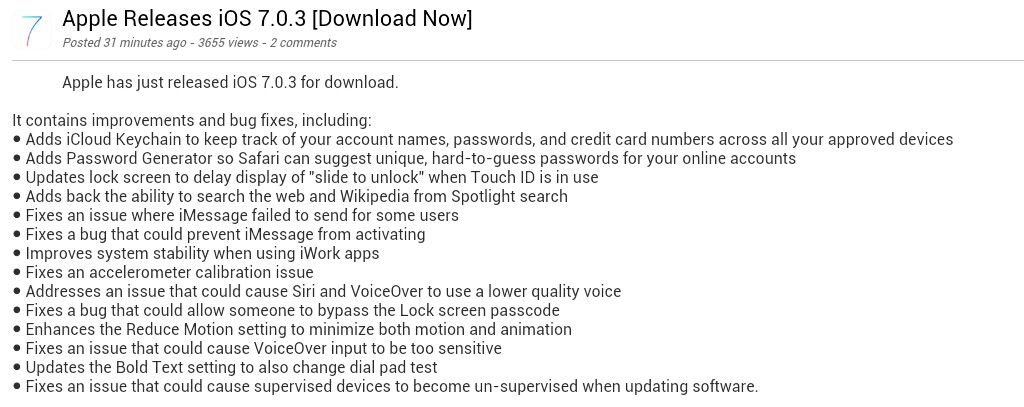
Apple Releases iOS 7.0.3
7.0.3 (4 GSM): iPhone3,1_7.0.3_11B511_Restore.ipsw
7.0.3 (4 8GB): iPhone3,2_7.0.3_11B511_Restore.ipsw
7.0.3 (4 CDMA): iPhone3,3_7.0.3_11B511_Restore.ipsw
7.0.3 (4S): iPhone4,1_7.0.3_11B511_Restore.ipsw
7.0.3 (5 GSM): iPhone5,1_7.0.3_11B511_Restore.ipsw
7.0.3 (5 GSM+CDMA): iPhone5,2_7.0.3_11B511_Restore.ipsw
7.0.3 (5c GSM): iPhone5,3_7.0.3_11B511_Restore.ipsw
7.0.3 (5c GSM+CDMA): iPhone5,4_7.0.3_11B511_Restore.ipsw
7.0.3 (5s GSM): iPhone6,1_7.0.3_11B511_Restore.ipsw
7.0.3 (5s GSM+CDMA): iPhone6,2_7.0.3_11B511_Restore.ipsw
7.0.3 (iPad 2 Wi-Fi): iPad2,1_7.0.3_11B511_Restore.ipsw
7.0.3 (iPad 2 GSM): iPad2,2_7.0.3_11B511_Restore.ipsw
7.0.3 (iPad 2 CDMA): iPad2,3_7.0.3_11B511_Restore.ipsw
7.0.3 (iPad 2 New): iPad2,4_7.0.3_11B511_Restore.ipsw
7.0.3 (iPad Mini Wi-Fi): iPad2,5_7.0.3_11B511_Restore.ipsw
7.0.3 (iPad Mini GSM): iPad2,6_7.0.3_11B511_Restore.ipsw
7.0.3 (iPad Mini CDMA): iPad2,7_7.0.3_11B511_Restore.ipsw
7.0.3 (iPad 3 Wi-Fi): iPad3,1_7.0.3_11B511_Restore.ipsw
7.0.3 (iPad 3 CDMA): iPad3,2_7.0.3_11B511_Restore.ipsw
7.0.3 (iPad 3 GSM): iPad3,3_7.0.3_11B511_Restore.ipsw
7.0.3 (iPad 4 Wi-Fi): iPad3,4_7.0.3_11B511_Restore.ipsw
7.0.3 (iPad 4 GSM): iPad3,5_7.0.3_11B511_Restore.ipsw
7.0.3 (iPad 4 GSM+CDMA): iPad3,6_7.0.3_11B511_Restore.ipsw
7.0.3 (iPad Air Wi-Fi): iPad4,1_7.0.3_11B511_Restore.ipsw
7.0.3 (iPad Air Cellular): iPad4,2_7.0.3_11B511_Restore.ipsw
7.0.3 (iPad Mini 2 Wi-Fi): iPad4,4_7.0.3_11B511_Restore.ipsw
7.0.3 (iPad Mini 2 Cellular): iPad4,5_7.0.3_11B511_Restore.ipsw
Friday, September 27, 2013
iOS 7.0.2 Released to the Public
Yesterday, Apple released iOS 7.0.2 to the public. iOS 7.0.2 is one of
the three additional software updates that were found to be in testing
along with iOS 7.0.1 (iPhone 5s and iPhone 5c only) and iOS 7.1 (still
unreleased).
iOS 7.0.2 is a small update for iOS 7 devices that fixes one of the known lock screen bypass glitches. In addition, it re-introduces the Greek keyboard option for entering passcodes.
At this point in time, the evad3rs are confident in a jailbreak for iOS 7.0, but they have not yet commented on the status of iOS 7.0.2. We expect that Apple, being themselves as usual, probably tucked some security updates in iOS 7.0.2. We would recommend holding off until the evad3rs have had a chance to check out the firmware.
On the other hand, if getting rid of the potentially harmful lock screen glitch is at the top of your priority list right now, then iOS 7.0.2 is available OTA (over the air) in the Settings application under the Software Update cell. You can also use iTunes if you prefer.
This article was originally published in forum thread: iOS 7.0.2 Released to the Public started.
Luckily, Apple prides itself on keeping security issues down to a minimum, and has been typically swift in its response to these well-documented problems. If you’re running iOS 7 on any device, we highly recommend you go ahead and download the update using iTunes, or simply using the OTA feature within your iPhone, iPad or iPod’s Settings pane.
iOS 7.0.2 is compatible to work with: iPhone 5s, 5c, 5, 4s, 4, iPad (2nd-gen and above), iPad mini, iPod touch (5th-gen).
iOS 7.0.2 Download Links:
* Apple releases iOS 7.0.2 fixes Lock screen vulnerability...
iOS 7.0.2 is a small update for iOS 7 devices that fixes one of the known lock screen bypass glitches. In addition, it re-introduces the Greek keyboard option for entering passcodes.
At this point in time, the evad3rs are confident in a jailbreak for iOS 7.0, but they have not yet commented on the status of iOS 7.0.2. We expect that Apple, being themselves as usual, probably tucked some security updates in iOS 7.0.2. We would recommend holding off until the evad3rs have had a chance to check out the firmware.
On the other hand, if getting rid of the potentially harmful lock screen glitch is at the top of your priority list right now, then iOS 7.0.2 is available OTA (over the air) in the Settings application under the Software Update cell. You can also use iTunes if you prefer.
This article was originally published in forum thread: iOS 7.0.2 Released to the Public started.
Luckily, Apple prides itself on keeping security issues down to a minimum, and has been typically swift in its response to these well-documented problems. If you’re running iOS 7 on any device, we highly recommend you go ahead and download the update using iTunes, or simply using the OTA feature within your iPhone, iPad or iPod’s Settings pane.
iOS 7.0.2 is compatible to work with: iPhone 5s, 5c, 5, 4s, 4, iPad (2nd-gen and above), iPad mini, iPod touch (5th-gen).
iOS 7.0.2 Download Links:
- iPad (4th generation CDMA)
- iPad (4th generation GSM)
- iPad (4th generation WiFi)
- iPad mini (CDMA)
- iPad mini (GSM)
- iPad mini (WiFi)
- iPad 3 Wi-Fi (3rd generation)
- iPad 3 Wi-Fi + Cellular (model for ATT)
- iPad 3 Wi-Fi + Cellular (model for Verizon)
- iPad 2 Wi-Fi (Rev A)
- iPad 2 Wi-Fi
- iPad 2 Wi-Fi + 3G (GSM)
- iPad 2 Wi-Fi + 3G (CDMA)
- iPhone 5 (CDMA)
- iPhone 5 (GSM)
- iPhone 5c (CDMA)
- iPhone 5c (GSM)
- iPhone 5s (CDMA)
- iPhone 5s (GSM)
- iPhone 4s
- iPhone 4 (GSM Rev A)
- iPhone 4 (GSM)
- iPhone 4 (CDMA)
- iPod touch (5th generation)
* Apple releases iOS 7.0.2 fixes Lock screen vulnerability...
Thursday, September 19, 2013
Download iOS 7 Final IPSW For iPhone 5, 4s, 4, iPad And iPod touch
iPad (4th generation CDMA)
iPad (4th generation GSM)
iPad (4th generation WiFi)
iPad mini (CDMA)
iPad mini (GSM)
iPad mini (WiFi)
iPad 3 Wi-Fi (3rd generation)
iPad 3 Wi-Fi + Cellular (model for ATT)
iPad 3 Wi-Fi + Cellular (model for Verizon)
iPad 2 Wi-Fi (Rev A)
iPad 2 Wi-Fi iPad 2 Wi-Fi + 3G (GSM)
iPad 2 Wi-Fi + 3G (CDMA)
iPhone 5 (CDMA)
iPhone 5 (GSM)
iPhone 4s
iPhone 4 (GSM Rev A)
iPhone 4 (GSM)
iPhone 4 (CDMA)
iPod touch (5th generation)
iPad (4th generation GSM)
iPad (4th generation WiFi)
iPad mini (CDMA)
iPad mini (GSM)
iPad mini (WiFi)
iPad 3 Wi-Fi (3rd generation)
iPad 3 Wi-Fi + Cellular (model for ATT)
iPad 3 Wi-Fi + Cellular (model for Verizon)
iPad 2 Wi-Fi (Rev A)
iPad 2 Wi-Fi iPad 2 Wi-Fi + 3G (GSM)
iPad 2 Wi-Fi + 3G (CDMA)
iPhone 5 (CDMA)
iPhone 5 (GSM)
iPhone 4s
iPhone 4 (GSM Rev A)
iPhone 4 (GSM)
iPhone 4 (CDMA)
iPod touch (5th generation)
Monday, September 3, 2012
HTC Radar C110 (Windows) Update via ZUNE
Just wanna share HTC Radar C110 windows phone update via ZUNE
by the way the problem of the unit why i am gonna do this is
when you call the screen get black display...
you cant see any thing just black display...
dont be afraid its not risky
must have 50% of battery
you must have ZUNE Software
and patience
check image below on how to...
Open Zune
Connect Unit on PC via USB
Install all driver @ Zune folder ( C:\Program Files\Zune)
by the way the problem of the unit why i am gonna do this is
when you call the screen get black display...
you cant see any thing just black display...
dont be afraid its not risky

must have 50% of battery
you must have ZUNE Software
and patience

check image below on how to...
Open Zune
Connect Unit on PC via USB
Install all driver @ Zune folder ( C:\Program Files\Zune)
Thursday, May 10, 2012
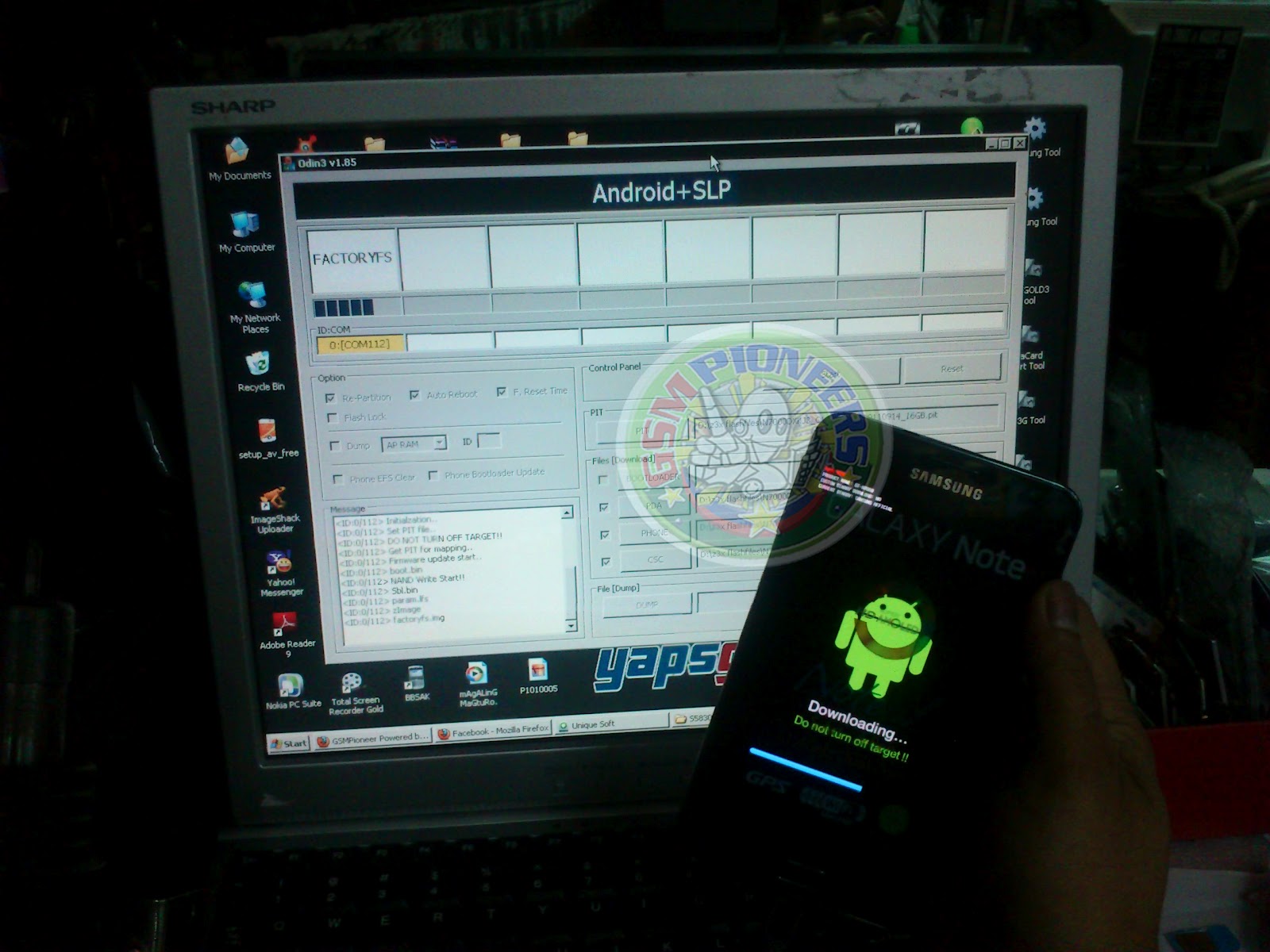
Samsung Galaxy Note N7000 Hang Revived by ODIN
just wanna share again this solution for refference...
Samsung Galaxy Note N7000 hang revived by ODIN
you must have ODIN V1.85
and add this : "PIT"
you can download Firmware @ www.samfirmware.com
just look at the image of odin software below for the instruction on how to insert firmware and also the settings.
you must have ODIN V1.85
and add this : "PIT"
you can download Firmware @ www.samfirmware.com
just look at the image of odin software below for the instruction on how to insert firmware and also the settings.
Tuesday, April 17, 2012
Samsung s5360T unlocked (18 pcs)
Procedure:
1. update the unit first using this file( ROOT)
2.after update, open z3x tool then tick info.
3. tick unlock
4.automaticaly restart the phone and finaly put simcard the phone is unlocked already .

Friday, April 6, 2012
HUAWEI U8230 Hang on Android Logo.
hope you do it your self also if you got this problem too:)
1:Copy dload to SD card( you can check download link below)
2:Switch off the handset ,then press "Volume Control Upper Key +End Key+ Power Key"
3:Wait the phone update and start up...
Done:)
Download:
HUAWEI U8230 Firmware
if have something questions just leave @ my chatbox.
br,
1:Copy dload to SD card( you can check download link below)
2:Switch off the handset ,then press "Volume Control Upper Key +End Key+ Power Key"
3:Wait the phone update and start up...
Done:)
Download:
HUAWEI U8230 Firmware
if have something questions just leave @ my chatbox.
br,
Monday, March 19, 2012
Samsung Galaxy mini (S5570) 22 pcs unlocked via Z3X
Procedure:
1. Enter code *#7284# - choise phone usb.
2. Enter code *#9090# - choise usb diag. (or *#197328640# -> 9 -> 4 -> usb diag ) then reboot phone
3. Connect cable. Setup drivers
4. Select Diagnostic port in port settings
5. Press Unlock SP button.

1. Enter code *#7284# - choise phone usb.
2. Enter code *#9090# - choise usb diag. (or *#197328640# -> 9 -> 4 -> usb diag ) then reboot phone
3. Connect cable. Setup drivers
4. Select Diagnostic port in port settings
5. Press Unlock SP button.

Nokia E71X headset problem done(14pcs)
Just wanna share this problem of E71x.
This model is not same with Nokia E71 coz this model dont have infront camera
The problem of this model is when you are using headset the left earpiece is not working
So i decide to modified..
just see image below...

This model is not same with Nokia E71 coz this model dont have infront camera
The problem of this model is when you are using headset the left earpiece is not working
So i decide to modified..
just see image below...
Thursday, April 21, 2011
Friday, December 17, 2010
Nokia 5250 memory full problem solution
hope this solution help you....
nokia 5250 here's the problem memory full

i reprogram on nokia tools but same problem...
i decide to open the phone and do this procedure...

after that procedure the phone is fine and works 100%....


-yaps-
nokia 5250 here's the problem memory full
i reprogram on nokia tools but same problem...
i decide to open the phone and do this procedure...

after that procedure the phone is fine and works 100%....
-yaps-
Saturday, October 16, 2010
Greenpoison Jailbreaker for iDevices...
Initially, this will be a Windows-only release. This is due to some technical complications that we soon hope to correct. We apologize for any inconvenience.
Thanks to geohot for the bootrom USB exploit. We have opted to use that instead of SHAtter for the sake of exploit presevation.
This release of greenpois0n supports:
- iPhone 4
- iPhone 3G S
- iPod touch (4th Generation)
- iPod touch (3rd Generation)
- iPad
Soon there will be another release, adding things like support for:
- Apple TV (2nd Generation)
- iPod touch (2nd Generation)

Download here:GREENPOISON
Thanks to geohot for the bootrom USB exploit. We have opted to use that instead of SHAtter for the sake of exploit presevation.
This release of greenpois0n supports:
- iPhone 4
- iPhone 3G S
- iPod touch (4th Generation)
- iPod touch (3rd Generation)
- iPad
Soon there will be another release, adding things like support for:
- Apple TV (2nd Generation)
- iPod touch (2nd Generation)

Download here:GREENPOISON
Sunday, October 10, 2010
limera1n

limera1n, 6 months in the making
iPhone 3GS, iPod Touch 3G, iPad, iPhone 4, iPod Touch 4G
4.0-4.1 and beyond+++
limera1n is unpatchable
untethered thanks to jailbreakme star comex
released today to get chronicdev to do the right thing
brought to you by geohot
Mac and Linux coming soon
follow the instructions in the box, sadly limera1n isn't one click
that's the price of unpatchability
as usual, donations appreciated but not required
still in beta, pardon my ragged edges
AppleTV is technically supported, but theres no apps yet
zero pictures of my face
known bugs
3GS new bootrom is broken, fix pending
some people need to restart to get the Cydia icon to show up after installing
some people still don't have windows
beta iOS versions aren't supported
uninstall in limera1n app doesn't work, you can just delete the blackra1n.app directory, i need regression testing
Download for Windows
Sunday, September 5, 2010
iPhone 3GS software...
hope you like this shell
inside include:
iTunes 10
Tiny Umbrella
JAVA
IPSW 4.02
IPSW 4.01
IPSW 4.0
DOWNLOAD LINK: CLICK ME
-yaps-
Saturday, September 4, 2010
How to Downgrade, Jailbreak and Unlock iPhone 3GS 4.02 to 4.01
heres my solution on how how to downgrade, jailbreak and unlock iPhone 3gs 4.02 to 4.01
You must have activation sim card like one sim or super sim to activate your iphone...
im using super sim as shown image below...

open Tiny Umbrella to save shsh...
then click save shshs wait till save your shsh...

ready for restoring..
open itunes, on your keyboard hold shift and click restore...select ipsw 4.01


restoring done....
now you can see the menu of your iPhone ready for jailbreaking...
Open wifi and go to Safari
type jailbreakme.com

easily touch the slide to unlock
wait till finish...


after jailbreaking you can now see cydia aplication...
Open cydia then upgrade all changes...
now you can procede to manage then add source..
add this...http://cydia.pushfix.info/

then install this...
to avoid Different SIM Detected
wait till finish and automatically reboot your unit...

For unlocking go to cydia, manage, add source then add and install repo666.ultrasnow.com
your iPhone now is jailbroken and unlock...

-yaps-
You must have activation sim card like one sim or super sim to activate your iphone...
im using super sim as shown image below...
open Tiny Umbrella to save shsh...
then click save shshs wait till save your shsh...
ready for restoring..
open itunes, on your keyboard hold shift and click restore...select ipsw 4.01

restoring done....
now you can see the menu of your iPhone ready for jailbreaking...
Open wifi and go to Safari
type jailbreakme.com

easily touch the slide to unlock
wait till finish...


after jailbreaking you can now see cydia aplication...
Open cydia then upgrade all changes...
now you can procede to manage then add source..
add this...http://cydia.pushfix.info/

then install this...
to avoid Different SIM Detected
wait till finish and automatically reboot your unit...

For unlocking go to cydia, manage, add source then add and install repo666.ultrasnow.com
your iPhone now is jailbroken and unlock...
-yaps-
Subscribe to:
Posts (Atom)